
Welcome to Amoura
Joining a new dating platform often comes with questions: What happens to my details? Can anyone message me without my consent? How do I actually meet people here?
Amoura is built around a straightforward premise: dating works best when people are honest about who they are, clear about what they want, and protected by sensible community baselines. We do not use hidden algorithms to trick your attention or lock your existing mutual conversations behind paywalls.
This onboarding guide walks you through your first session—from filling in the registration form to discovering candidate profiles and sending your first message. It is designed to get you comfortable with the application quickly, without overwhelming you with dating theory.
What This Guide Covers
We focus strictly on the mechanics of getting set up: prerequisites, registration fields, photo requirements, discovery controls, and how mutual messaging works. For specialist topics—such as selecting dating photographs, writing thoughtful bios, or navigating online safety—we provide contextual links to dedicated guides throughout.
Before You Join: Practical Prerequisites
Before opening the registration screen, make sure you have the following essentials in place. This will ensure your onboarding is smooth and uninterrupted.
1. You Must Be at Least 18 Years Old
Amoura is strictly an adult dating platform. We do not permit minors under any circumstances, and our registration system automatically calculates chronological age from your date of birth. Anyone under 18 is immediately blocked from registration.
For our complete policy rationale and age compliance architecture, read our full article: Why Amoura Is an 18+ Dating Platform.
2. An Active, Accessible Email Address
You will need an email address you can check immediately. Once you submit the registration form, our system dispatches a 6-digit confirmation code. You must enter this code or click the confirmation link to activate your account.
3. At Least Two Clear Personal Photos
Amoura enforces an authoritative 2-photo minimum before any account can access the Discover feed. We do not permit blank profiles, stock graphics, or single-image placeholders. Have at least two clear, recent pictures of yourself ready on your device.
4. Modern Browser with Cookies & JavaScript
Amoura is a modern, responsive web application. It requires JavaScript enabled for interactive matching, and first-party session cookies enabled to maintain your secure authenticated session.
Creating Your Account
To begin, visit the Amoura welcome screen and select the Sign Up tab on the authentication card.
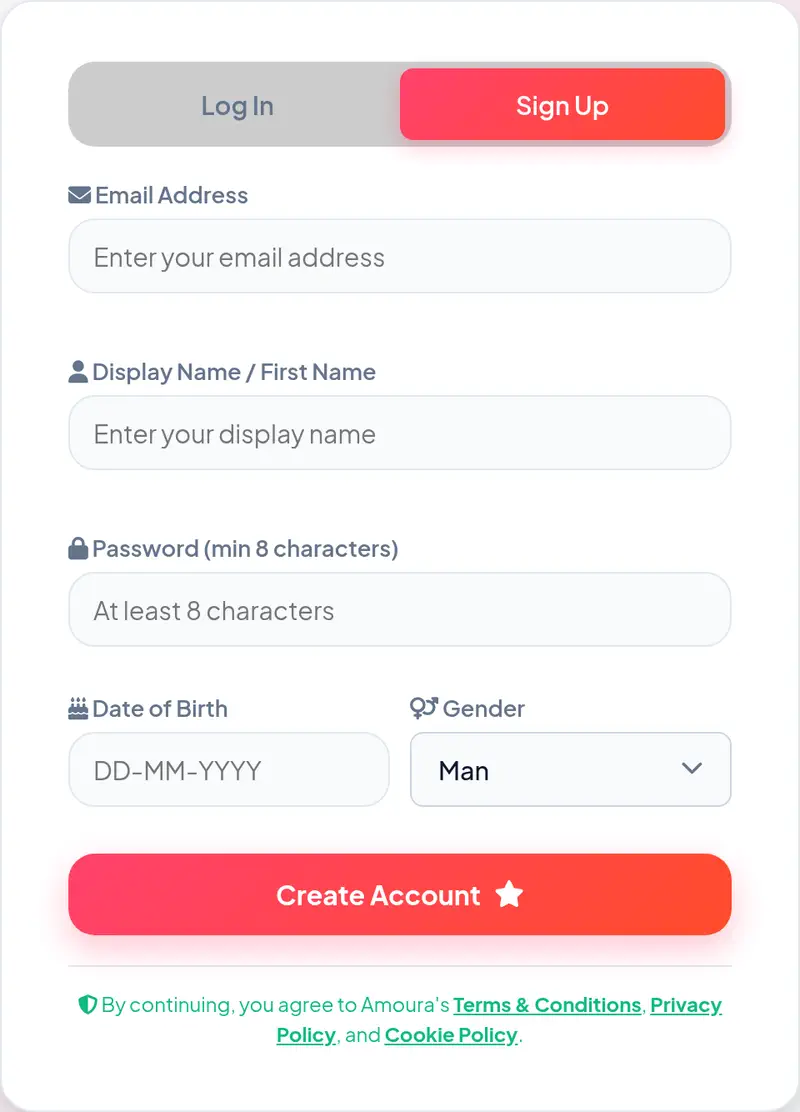
Figure 1: The actual Amoura registration form showing mandatory fields and age validation.
The registration form collects only the essential credentials required to establish a secure account:
- Email Address: Used for account security, login credentials, and one-time email confirmation. This address is never displayed on your public profile or shared with other members.
- Display Name / First Name: The name candidates will see when viewing your profile in Discover. You can use your first name or a chosen display name.
- Password: Must be at least 8 characters long. We recommend using a unique password that you do not use on other websites.
-
Date of Birth: Entered in
DD-MM-YYYYformat. This is strictly required to verify that you are at least 18 years old. Your exact birth date remains private; only your calculated age in years is visible on your profile. - Gender: Select your gender from the dropdown menu (Man, Woman, Non-binary, or Other). This informs discovery matching preferences.
Once you have entered your details and agreed to our Terms and Privacy Policy, click Create Account to submit the form. If you prefer, you can also sign up using Google Single Sign-On on supported devices.
Essential Onboarding: Email & Photo Studio
Once your account is created, Amoura guides you through two mandatory onboarding steps before you can browse other members:
1. Email Verification
Immediately after form submission, a verification screen opens. We send a 6-digit verification code to the email address you provided.
Check your inbox, locate the message from Amoura, and enter the 6-digit code into the prompt. Alternatively, click the verification link included in the email. If the message does not appear within a minute, check your spam or junk folder. A resend countdown button unlocks after 30 seconds if you need a new code.
For a full explanation of why email verification matters for account security, see our guide on Profile Verification & Authenticity.
2. The Photo Studio (Mandatory 2-Photo Minimum)
Once your email is verified, you enter the Photo Studio. Dating platforms without visual standards often suffer from faceless accounts, ghost profiles, and low trust. To protect the quality of the community, Amoura requires every member to upload at least two photos before entering Discover.
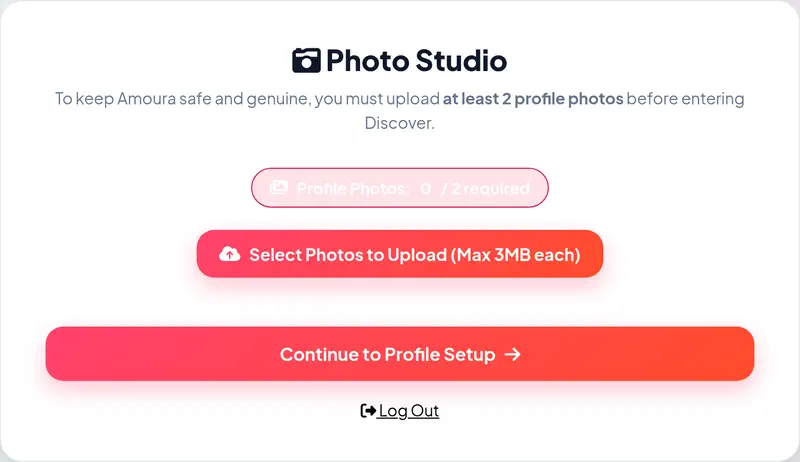
Figure 2: The Amoura Photo Studio onboarding card showing the photo progress indicator (0 / 2 required).
Click Select Photos to Upload to choose images from your device. Supported formats include JPEG, PNG, and WebP, with a maximum size of 3MB per file. As you add photos, the progress badge updates. Once you reach at least two photos, the Continue to Profile Setup button becomes active.
Choosing Effective Photos
Clear, well-lit photos showing your actual face yield significantly better dating outcomes than group shots or heavily filtered images. For detailed guidance on choosing photos that represent you accurately and attract compatible matches, consult our dedicated guide: How to Choose Good Dating Photos.
Setting Up Your Profile
After the Photo Studio, you are prompted to complete your profile details. While you can update these at any time in Account Settings, taking a few minutes to fill them out now dramatically improves your match relevance.
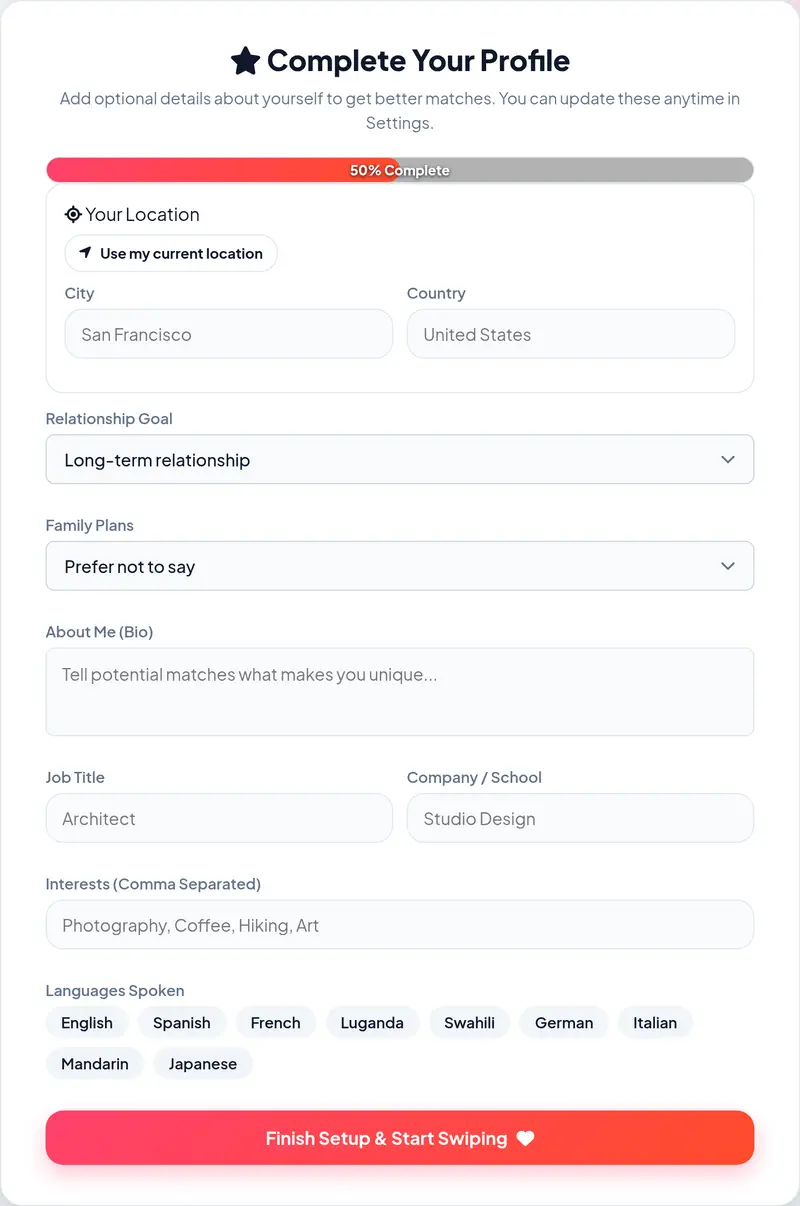
Figure 3: The Profile Setup screen featuring location detection, relationship goals, and bio fields.
Key fields on this screen include:
- Your Location: Tap Use my current location to automatically detect your approximate city, or type your city and country manually. Amoura uses this to calculate match distance, but never exposes your street address or coordinates.
- Relationship Goal: Be upfront about what you are seeking. Options include Long-term relationship, Serious relationship, Marriage, Casual dating, Friendship, Open to all possibilities, or Still figuring it out.
- Family Plans: Indicate your preferences regarding children (e.g. Wants children, Doesn't want children, Has children, Open to children, or Prefer not to say).
- About Me (Bio): A short, personal summary introducing your personality, lifestyle, or passions.
- Work & Education: Optional fields for your Job Title and Company / School.
- Interests: Comma-separated tags (such as Photography, Coffee, Hiking, Art) that help potential matches spot common ground.
- Languages Spoken: Checkboxes for languages you speak comfortably (e.g. English, Spanish, French, Luganda, Swahili, German, Italian, Mandarin, Japanese).
When you are ready, tap Finish Setup & Start Swiping to enter the main application.
Honesty Leads to Better Connections
Writing an honest, natural bio saves time for both you and your potential matches. For practical advice on describing yourself authentically without oversharing, refer to our dedicated guide: How to Create an Honest Dating Profile.
Finding People: The Discover Experience
The default screen when you enter Amoura is Discover. Here, potential candidates are presented one card at a time based on your discovery preferences.
Card Actions and Controls
On mobile, you can swipe candidate cards directly. On desktop or tablet, you can use either the on-screen buttons below the card stack or quick keyboard shortcuts:
Tap the red cross or press the Left Arrow (←) key to pass on a profile.
Tap the chevron or press the Up Arrow (↑) key to inspect full bio, prompts, and photos.
Tap the green heart or press the Right Arrow (→) key to like a profile.
Accidentally passed? Tap Rewind or press the R key (R) to bring back the last card.
Inspecting Candidate Details
Don't judge candidates solely on a first impression. On desktop screens (1024px and wider), candidate details appear side-by-side in a dedicated panel. On mobile, tapping the details button slides up the candidate profile. Here you can review their full bio, additional photos, relationship intentions, languages, and answers to profile prompts before deciding whether to like them.
Adjusting Discovery Filters
In the top header or sidebar, tap the Sliders icon () to open your Discovery Preferences. Here you can set:
- Age Range: Define the minimum and maximum age of people you wish to meet.
- Maximum Distance: Restrict candidate discovery within a radius (e.g. up to 25 km or 50 miles).
- Interested In: Choose to view men, women, or all genders.
Starting Conversations: Matches and Messaging
Amoura operates on a strict mutual match model. You cannot be cold-messaged by people you have not liked, and you cannot message another member until they have also expressed mutual interest.
How Matches Happen
There are two ways a mutual match is formed:
- Discover Stack: You like someone in Discover, and they subsequently like you back when your card appears in their feed.
- Likes Tab: When someone likes your profile, they appear in your Likes section ("People Who Liked You"). You can view their card and tap Like back to create an immediate match.
Opening a Conversation
Once a match is created, the member appears in your New Matches row. Tapping their card opens a private conversation thread in Messages.
Our messaging interface supports real-time text chatting, unread status indicators, and active typing feedback. In addition, every active chat header includes a secure Video Call button (). This allows mutually agreed live video calls, providing a safe, low-pressure way to verify chemistry and authenticity before arranging to meet in person.
First Message Advice
A thoughtful first message referencing a specific interest, travel photo, or prompt answer yields far higher response rates than a generic "hey". For concrete conversation openers and healthy messaging habits, explore our dedicated guides: How to Start a Conversation on a Dating App and How to Have Better Conversations While Dating.
Navigating the Rest of the App
Navigation in Amoura is clean and persistent. On mobile devices, key sections are accessible through the bottom navigation bar. On desktop, they are pinned to the left sidebar.

Figure 4: The persistent navigation bar giving instant access to Discover, Likes, New Matches, Messages, and Profile.
A Sensible Way to Begin: Your First 15 Minutes
When joining any dating service, it is easy to fall into rapid swiping without taking time to evaluate what you actually want. Here is a sensible 15-minute pacing recommendation for your first session:
Complete Your Bio Before Swiping (Minutes 1–5)
A complete profile with a genuine bio and answered prompts receives significantly more reciprocal likes than an empty card with just photos. Spend five minutes filling out your relationship goals and interests.
Set Realistic Discovery Filters (Minutes 6–7)
Open your preferences and set a distance radius and age range that reflect where you are actually willing to travel and meet. Setting realistic filters upfront saves time and prevents awkward logistics later.
Browse Deliberately (Minutes 8–12)
Inspect full profile cards rather than reacting solely to the primary photo. Read bios, note common passions, and like candidates whose intentions align with your own.
Check Your Likes Tab & Start One Conversation (Minutes 13–15)
If someone has already liked you, review their card. If interested, like them back and send an initial message referencing something specific from their profile.
Where to Find Help & Safety Resources
Your safety, dignity, and privacy are foundational to how Amoura operates. We maintain extensive public documentation explaining every facet of platform governance:
Practical advice on spotting romance fraud, preserving privacy, and planning safe in-person dates.
Our enforceable standards prohibiting harassment, deception, illegal acts, and explicit material.
Step-by-step instructions for reporting abusive behavior, fake profiles, or harassment directly from cards or chat.
A transparent breakdown of data isolation, location privacy, discovery toggles, and permanent account deletion.
Frequently Asked Questions
Does creating a Amoura account cost anything?
No. Account registration, mandatory photo setup, candidate discovery, mutual matching, text messaging, and in-app video calling are completely free. You will never encounter unexpected paywalls just to reply to someone who has liked you back.
Can I change my display name, age, or gender after registration?
You can update your display name, gender, bio, location, and photos at any time in Profile Settings. However, your date of birth is locked once verified to preserve age verification integrity and protect the platform against underage access. If you made an honest typo during signup, contact customer support for manual assistance.
Why do I have to upload two photos before I can browse profiles?
The two-photo minimum prevents ghost accounts, lurkers, and placeholder profiles. It ensures that everyone participating in the Discover feed contributes genuine visual representation, creating a reciprocal and trustworthy experience for all members.
How does Amoura choose which profiles I see in Discover?
Profiles are presented based on your defined Discovery Preferences: geographic distance radius, age range parameters, mutual gender preferences, and active profile status. Members who have hidden their profiles in discovery settings will not appear.
Can someone message me without matching first?
No. Amoura strictly enforces mutual matching. You will never receive unsolicited messages or cold contact from strangers. Both participants must like each other before a conversation thread can open.
How do I temporarily pause my account if I want a break?
In your Account Settings under Discovery Visibility, simply toggle on "Hide My Profile from Discovery". Your profile card will immediately stop appearing to new people in swipe feeds and search results, while your existing matches and chat conversations remain fully accessible.