
Blocking and Reporting Are Not the Same Thing
When someone crosses a line or makes you feel uneasy on a dating platform, apps typically offer two primary safety mechanisms: blocking and reporting. While these features are often grouped together in action menus, they serve fundamentally different purposes and trigger very different workflows.
Understanding the distinction allows you to choose the right response without second-guessing yourself:
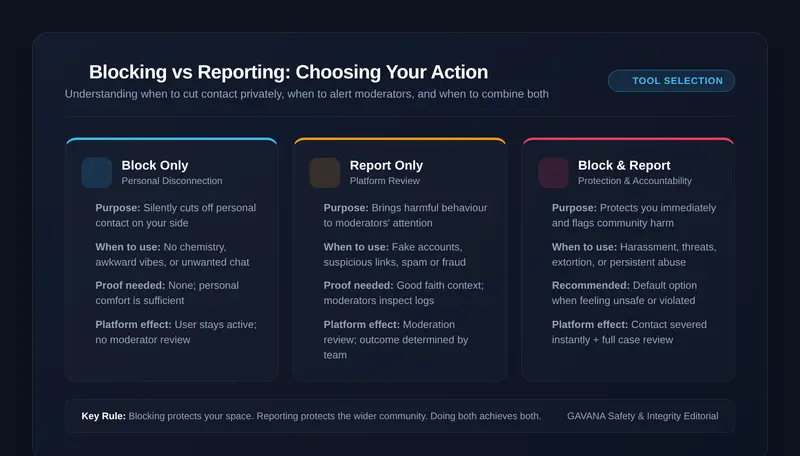
- Blocking is a personal boundary tool: It immediately removes that individual from your digital space. It stops them from messaging you, viewing your profile, or appearing in your discovery feed. Blocking is an autonomous action that takes effect instantly for your personal protection—it does not notify platform moderators or initiate an account investigation.
- Reporting is a community accountability tool: It flags a profile, message thread, or specific behavior for review by the platform's moderation team. Reporting is meant for conduct that breaks platform guidelines, such as scams, harassment, hate speech, explicit unsolicited imagery, or impersonation.
You can use either tool independently, or combine both in high-stakes situations. Knowing when each makes sense prevents unnecessary stress and gives you complete authority over your dating experience.
When Blocking May Make Sense
One of the most common misconceptions about blocking is believing that someone must have broken a serious rule before you are "allowed" to block them. In reality, you never need a grand justification to block another person.
Blocking is appropriate whenever an interaction simply no longer serves your well-being. Common scenarios include:
- A complete absence of chemistry or mutual connection: If a conversation has run its course, feels awkward, or you simply realize you are not interested, blocking or unmatching is a peaceful, standard way to conclude contact.
- Unwanted persistence after saying no: If you have politely explained that you do not wish to meet or continue chatting, but they continue messaging or double-texting, blocking sets an effortless, silent boundary.
- Ex-partners, acquaintances, or coworkers: You may stumble across an ex-partner, a relative, or a professional colleague on the discovery feed. Blocking their profile ensures mutual privacy and prevents awkward crossover without making any formal complaint.
- Vague discomfort or mismatched conversational energy: If someone's communication style feels overbearing, pushy, or exhausts your patience, blocking preserves your time and mental focus.
Blocking Does Not Require a Crime
You are not serving a legal summons. You are curating who has access to your attention. You can block someone silently, immediately, and without apology.
When Reporting May Be Appropriate
While blocking handles personal boundaries, reporting comes into play when someone's behavior violates platform rules or poses a potential risk to other members of the community.
Consider submitting a report when you encounter:
Behavior That Warrants Platform Review
- Harassment, Abuse, or Threats: Hostile language, discriminatory remarks, intimidation, or explicit threats of violence.
- Scams and Solicitations for Money: Requests for emergency wire transfers, crypto investments, gift cards, or links to suspicious external payment sites. For scam mechanics, read How to Recognise a Romance Scam.
- Impersonation or False Personas: Using stolen photographs, celebrities' likenesses, or operating automated bot accounts. See our guide on How to Spot a Fake Dating Profile.
- Unsolicited Sexual Content: Sending explicit sexual imagery, non-consensual nudity, or demanding intimate photographs.
- Underage Presence: Any indication that a user is under the legal platform age of 18.
When you report someone, you provide the safety team with context so they can investigate patterns across multiple accounts. For step-by-step instructions on navigating Amoura's specific reporting system, consult our dedicated guide on How to Report a User on Amoura.
When You May Want to Do Both
In many situations involving abusive or deceptive conduct, taking a single action is not enough: you want the platform to investigate the rule violation, but you also need that person removed from your private messages immediately.
This is why Amoura provides a unified workflow. When you open the Block / Report User modal from a conversation or profile card, submitting a report automatically offers a pre-checked option: "Also Block this user immediately".
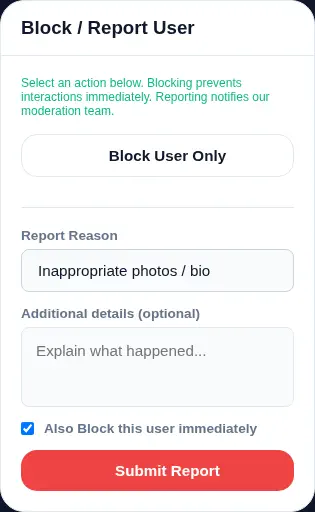
Amoura Block / Report interface — you can choose "Block User Only" or submit a categorized report with instant blocking applied simultaneously.
Combining both actions ensures that:
- The other person cannot send further messages, view your profile, or monitor your online activity.
- The existing conversation thread and profile details are packaged and submitted to moderators for review.
- You can close the app with immediate peace of mind, knowing you are protected while the community safety process unfolds.
What Blocking Does — and Doesn't — Mean
Understanding the technical realities of blocking helps set realistic expectations about what the tool accomplishes:
- What it does: On Amoura, blocking is bidirectional. The blocked member immediately disappears from your Discover results, match list, and active chats. Likewise, your profile becomes completely invisible to them, and they cannot initiate new conversations with you.
- It does not alert the user: Dating apps do not send push notifications saying "You have been blocked." The conversation thread simply disappears from their active inbox, appearing as an ordinary unmatch.
- It does not prevent off-platform contact: Blocking someone inside a dating app only affects their access within that specific app. If you have already exchanged mobile phone numbers, WhatsApp, or Instagram handles, you must block them separately across those third-party channels.
- It is manageable: In Amoura, you can review members you have blocked under Account Settings > Safety > Blocked Users, where you can unblock an account if you ever wish to do so.
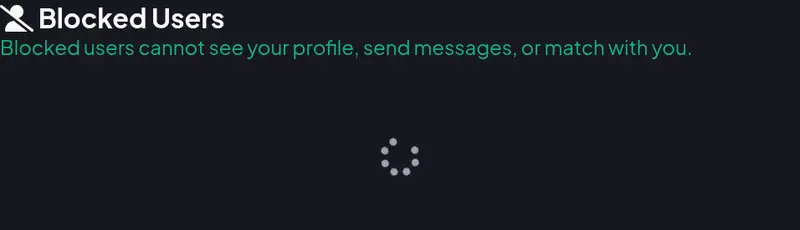
Amoura Account Settings — view and manage previously blocked users with one-click unblock controls.
What Reporting Does — and Doesn't — Mean
It is equally important to understand how reporting works on platform backends so you have clarity around the process:
- Reporting submits an allegation for review: When you submit a report, moderation teams inspect the report category, message logs, and account history against established Community Guidelines.
- It does not guarantee an immediate ban: Moderation is an evidence-based operational process. Depending on severity, outcomes range from account warnings and temporary suspensions to permanent account termination. For an honest look at system mechanics, see How Amoura Moderation Works.
- The reporter does not control the verdict: Submitting a report does not make you the judge; it alerts the platform to investigate. You will generally not receive granular updates on the private disciplinary actions taken against another member's account due to data privacy laws.
- Reports are confidential: The reported user is never informed who submitted the report against them.
Before You Block or Report: Practical Steps
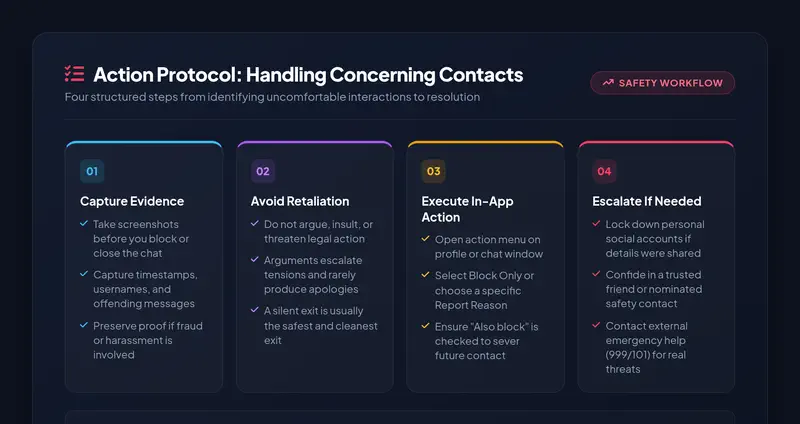
When an interaction becomes contentious or intimidating, acting in a calm, structured sequence protects your interests:
- Preserve the Evidence First: Once an account is blocked or deleted, the conversation thread may disappear from your view. If the messages contain financial fraud, cyber-blackmail, or severe harassment, take clear screenshots showing the user's handle, profile photos, and the timestamped messages before tapping Block.
- Avoid Confrontation or Threats: Do not announce: "I am reporting you to the police and getting your account banned!" Alerting a bad actor often prompts them to delete evidence, escalate abuse, or create new accounts to circumvent your boundaries. A quiet, decisive exit is always the safest exit.
- Check Connected Channels: If you shared an Instagram handle, phone number, or email address before realizing the red flags, block them across those external networks simultaneously. For advice on limiting exposed identifiers, see Protecting Your Personal Information While Dating Online.
If Someone Blocks You: Respecting Digital Boundaries
Being on the receiving end of a block or sudden unmatch can feel confusing, frustrating, or disappointing. It is completely natural to feel a sting of rejection or wonder what went wrong.
However, digital boundaries must always be honored with maturity:
- Do not attempt to circumvent the block: Never create a secondary account, message them through another dating app, or seek out their private social media profiles to ask why you were unmatched. Pursuing someone after they have chosen to disconnect is intrusive and crosses directly into harassment.
- Accept that autonomy works both ways: Just as you possess the complete right to block anyone who makes you uncomfortable without giving an essay of explanations, other members possess that same right.
- Take a breath and move forward: In online dating, people disengage for dozens of reasons that have nothing to do with you—busy schedules, rekindled offline relationships, or general dating fatigue. Take it in stride and focus your energy on people who are enthusiastic about connecting (for practical coping strategies, read How to Deal with Rejection While Dating and Online Dating Etiquette).
When You Feel Immediately Unsafe: Escalating to Help
Dating app safety tools are designed for platform governance. They are not a substitute for emergency services when someone poses an active, real-world danger to your physical safety or well-being.
If someone threatens you with physical harm, stalks your home or workplace, or attempts blackmail:
- Call Emergency Services Immediately: In the UK, dial 999 for immediate police assistance. In the US, call 911.
- UK Silent Solution: If you are in immediate danger and need to call 999 from a mobile phone but cannot speak safely, dial 55 when prompted by the emergency operator to alert police to dispatch assistance without speaking aloud.
- Non-Emergency Reporting: In the UK, call 101 to report non-urgent stalking, harassment, or threats after the fact.
- National Helplines: Contact the National Stalking Helpline (Suzy Lamplugh Trust) at 0808 802 0300 for specialist support, or visit our central Amoura Safety Centre for additional verified resources.
Frequently Asked Questions
What's the main difference between blocking and reporting?
Blocking is an instant, personal tool that prevents another member from viewing your profile or contacting you. Reporting sends a flag and message context to platform moderators to investigate whether the user violated community guidelines. You block to protect your space; you report to bring rule-breaking to the platform's attention.
Do I need proof before reporting someone on a dating app?
No. You do not need to assemble proof like a detective. You only need to submit an honest, good-faith report selecting the relevant category (such as harassment, spam, or inappropriate content). Platform moderation teams review server logs, account history, and context to determine appropriate enforcement.
Can I block someone without reporting them?
Yes. On Amoura, you can tap "Block User Only" in the safety modal. This immediately severs contact and removes the user from your feed without submitting a report to moderators. It is the ideal option when you simply feel no chemistry, want conversational privacy, or wish to disengage quietly.
Does the other person know when I block or report them?
No. Dating apps do not notify users that they have been blocked or reported. From their perspective, your conversation thread simply disappears, exactly as if you had unmatched or deactivated your profile. Reports submitted to moderation are strictly confidential.
Can I unblock someone later if I change my mind?
Yes. On Amoura, you can access your blocked users list at any time under Account Settings > Safety > Blocked Users. Tapping "Unblock" restores their eligibility to appear in future discovery results, though past conversations are permanently cleared for privacy.