
Why Reporting Matters
Every genuine connection starts with trust. Most people on Amoura are here for authentic dating and meaningful conversations, but whenever someone behaves abusively, shares deceptive profile information, or asks for money, you should not have to tolerate it.
Submitting a report is how you alert our safety team to behaviour that breaks our Community Guidelines. It takes less than thirty seconds, remains completely confidential, and helps keep other members safe from repeat offenders.
Your Report Is Strictly Confidential
When you report another member on Amoura, they are never told who reported them, what reason was selected, or when the report was submitted. You can flag inappropriate behaviour without worrying about retaliation.
When You Should Report Someone
You do not need legal proof or extensive evidence to submit a report. If something feels fraudulent, dishonest, or threatening, reporting brings it to human safety reviewers who evaluate the account.
Here are common situations where submitting a report is the right step:
Financial Requests & Scams
Anyone asking for cash, gift cards, emergency travel funds, bank transfers, or cryptocurrency investments (read How to Recognise a Romance Scam and What to Do If Someone Asks You for Money).
Harassment or Verbal Abuse
Threats, insults, persistent unwanted contact after being told to stop, or demeaning messages targeting identity.
Fake Profiles & Impersonation
Stolen photos, bot-like repetitive messaging, celebrity impersonators, or accounts promoting commercial links (see How to Spot a Fake Dating Profile).
Inappropriate Photos or Bio
Graphic imagery, nudity, explicit sexual solicitations, or hate symbols displayed on profile cards or media (see Why You Should Never Send Intimate Photographs).
Underage Users
Anyone who appears to be under 18 years of age or states in chat that they are a minor (review our 18+ Adult Dating Policy).
Spam & Commercial Solicitation
Accounts driving traffic to paid webcam services, subscription sites, or third-party money apps.
What you don't need to report: A polite conversation that simply didn't click, someone taking a day to reply, or a mutual mismatch. For those situations, simply unmatch or pass. Reporting is reserved for behaviour that conflicts with platform safety rules (for broader advice, see How to Block and Report Someone on a Dating App).
Step-by-Step: How to Report on Amoura
The reporting action is accessible directly within the app, whether you are browsing cards on the Discover feed or actively chatting in a conversation thread.
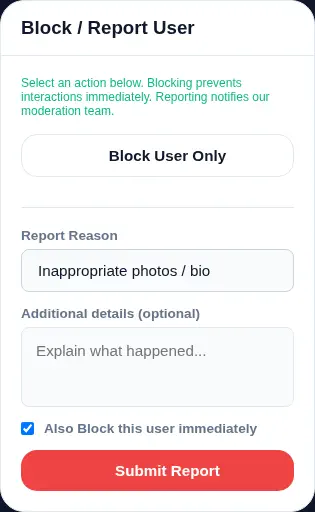
Method A: Reporting from the Discover Feed
If you come across an inappropriate photo, a fake bio, or a suspicious profile while browsing matches:
- Locate the Safety Button: Look at the top-right corner of the profile card. Tap the circular Block / Report icon ().
- Open the Report Form: The Block / Report User modal will appear on your screen.
- Choose Your Reason: Under Report Reason, tap the dropdown menu and select the category that best describes the issue (see below for available options).
- Add Helpful Context (Optional): In the text area labelled Additional details (optional), briefly explain what you noticed (e.g. "Profile claims to be 28 but says they are 16 in bio" or "Immediately sent external payment link").
- Confirm Immediate Blocking: Leave the checkbox "Also Block this user immediately" checked. This ensures the account is removed from your Discover feed right away.
- Tap Submit Report: Press the red Submit Report button. You will see a confirmation notification confirming your submission.
Method B: Reporting from Inside a Conversation
If someone sends offensive messages, asks for financial transfers, or behaves abusively during chat:
- Open Chat Options: In the top-right corner of the chat window, tap the three vertical dots menu ().
- Select "Report User": From the dropdown menu, tap the red Report User () option.
- Select Reason & Add Notes: Choose the relevant category from the dropdown and type any specific context from the conversation.
- Keep "Also Block" Checked: Leaving this enabled immediately closes the conversation, unmatches the user, and prevents them from sending any further messages.
- Tap Submit Report: Confirm by pressing Submit Report. The chat window closes automatically and your report is routed to our safety queue.
Mobile & Desktop Consistency
The reporting workflow works identically on mobile phones, tablets, and desktop browsers. On touchscreen devices, selecting the report reason opens an accessible option picker designed for one-handed operation.
Official Report Reasons Explained
When submitting a report, selecting the closest category helps route your report efficiently. Here is what each option in the Amoura reporting modal covers:
Inappropriate photos / bio
Use this when a profile photo includes explicit nudity, sexually suggestive media, graphic content, copyright violations, or when the bio text contains vulgar language, commercial advertising, or hate speech.
Spam or Fake Profile
Select this if the account is an obvious bot, repeats identical marketing messages, links to third-party commercial websites, impersonates another person, or uses stock model photos to deceive members.
Harassment or Abuse
Choose this when a member uses hostile language, issues personal threats, engages in bullying, makes non-consensual sexual remarks, or continues messaging after being asked to stop.
Underage User
Amoura is strictly for adults aged 18 and older. If you suspect an account belongs to a minor, or if someone reveals they are under 18 in conversation, select this category. Reports in this category receive high-priority triage.
Other reason
If the issue does not neatly fit the above categories—such as financial requests, unsolicited cryptocurrency pitches, or attempts to harvest private phone numbers—select Other reason and write a brief description in the details box.
What Makes a Report Useful?
While adding additional details is optional, providing concise, factual context makes a significant difference during review. Safety reviewers evaluate evidence, and clear details help them understand exactly what took place.
| Helpful, Factual Reports | Vague or Emotional Reports |
|---|---|
| Specific action: "User asked me to send £50 for travel money via an external link after two messages." | Vague statement: "This person is a total scammer." (No details on what they actually said or did.) |
| Distinguishes observed facts: "In chat, user stated they are 16 years old." | Unsubstantiated assumption: "I think they're lying about everything." |
| Objective boundary: "User sent abusive insults after I politely unmatched." | Retaliatory reporting: "I don't like their haircut / they didn't reply to my message." |
Tips for writing your notes:
- Stick to what actually happened: Summarize the specific behaviour rather than assuming motives.
- Mention off-platform redirection: If the user immediately tried pushing you to an external chat service or asked for your bank details, state that clearly.
- Avoid exaggeration: Factual, calm descriptions carry weight and help reviewers reach a fair, accurate determination.
Reporting vs. Blocking: What's the Difference?
Members frequently ask whether they should report, block, or both. The Amoura interface provides both options directly in the same dialog:
Blocking (Immediate Personal Control)
Blocking is an instant user-side control. It removes the member from your Discover feed, closes your match, and prevents them from viewing your profile or messaging you again.
Best for: Discomfort, boundary enforcement, or unwanted contact that does not break community rules.Reporting (Platform-Level Action)
Reporting alerts our moderation team. It initiates a case review to determine whether the user broke platform rules and whether warnings or account termination should be applied.
Best for: Scams, harassment, underage users, fake profiles, and explicit content.The Recommended Approach: By keeping the "Also Block this user immediately" checkbox selected when you report, you get both protections simultaneously: immediate personal safety and platform-wide moderation review.
What Happens After You Submit a Report?
Once you submit your report, you will see a confirmation toast: "Report submitted. Thank you for helping keep our community safe." Behind the scenes, the report enters our safety infrastructure:
- Incident Prioritization: Severe categories such as underage safety or harassment are automatically escalated to priority queues.
- Independent Case Review: Reviewers examine the reported profile, narrative notes, and interaction context against our policies.
- Proportionate Resolution: Depending on the findings, appropriate action is taken—ranging from dismissal of unsubstantiated flags to warnings, photo deletions, temporary suspensions, or permanent bans.
To learn more about how cases are reviewed and decided, read our detailed guide on How Amoura Moderation Works.
Why We Don't Share Individual Outcomes
For privacy and safety reasons, Amoura does not provide private status updates on disciplinary actions taken against other members' accounts. Rest assured that every report is logged in internal audit records and reviewed thoroughly.
If You Feel Immediately Unsafe
An in-app report is designed for platform safety and moderation—it is not an emergency dispatch service.
Emergency Situations Require Emergency Services
If someone makes imminent threats against your physical safety, displays stalking behaviour in person, or if you are in immediate danger, do not wait for an in-app report review. Contact your local emergency services right away:
- United Kingdom: Call 999 (or 111 for non-emergencies)
- United States & Canada: Call 911
- European Union: Call 112
For comprehensive crisis helplines and external support organisations, visit the Amoura Safety Centre Helpline Directory.
What If I Reported Someone by Mistake?
Accidental taps happen. Because Amoura evaluates reports contextually rather than applying automatic bans on the spot, an isolated report does not automatically penalize an innocent account.
When our moderation team reviews a reported profile and finds no policy infractions, suspicious patterns, or abusive messages, the case is dismissed and cleared. If you also accidentally blocked someone you wanted to keep talking to, you can reach out to our member support team at support@reverse-proxy.co.uk with your account details for assistance.
Reporting Questions & Answers
Will the person I reported find out that I reported them?
No. Reporting on Amoura is completely confidential. The reported member is never notified of who submitted the report, what reason was chosen, or any of the details you entered.
Can I report someone after I have already unmatched or blocked them?
Because blocking removes the member from your active views, we strongly recommend reporting them first using the built-in "Also Block" option so both actions happen together. If you already blocked them and need to report severe behaviour, contact support at support@reverse-proxy.co.uk with their display name and approximate date of conversation.
Do I need to take screenshots of the chat before reporting?
You do not need to attach screenshots to your report. Internal records and conversation logs within Amoura are securely preserved during incident investigations so safety moderators can verify the reported conduct directly.
What happens if someone submits a false or retaliatory report against me?
We know that members sometimes report someone out of disappointment when a conversation doesn't go their way. Our safety team looks for real policy breaches, chat context, and evidence before taking any action. False or frivolous reports are simply dismissed with no penalty to your account.
How many reports does it take for an account to be removed?
There is no fixed quota. A single report documenting serious harm—such as financial fraud, underage use, or explicit harassment—can result in immediate permanent termination. Conversely, multiple false flags will not result in penalties if no actual rules were violated.